 Build my stack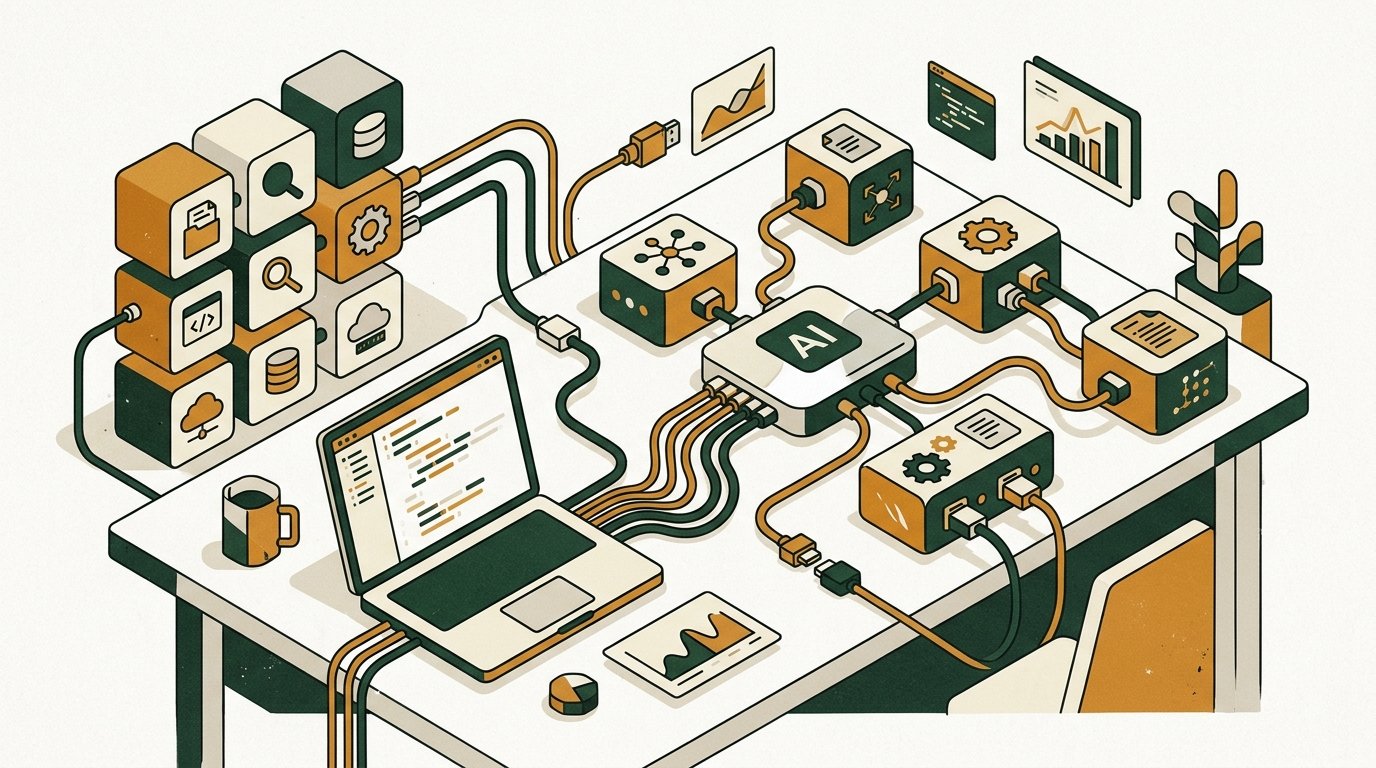
- The Model Context Protocol (MCP) is the universal open standard connecting AI coding agents to filesystems, databases, browsers, and APIs.
- The four essential starter servers are Filesystem (sandboxed file access, 420 tokens), GitHub (repo/PR management, 1,850 tokens), Brave Search (real-time web search, 890 tokens), and Playwright (browser UI automation, 2,840 tokens).
- The Tool Bloat Ceiling: connecting more than 4 to 6 active servers burns thousands of context tokens on tool schemas and causes reasoning degradation.
- Security rule: never connect an MCP server to production databases with write access; enforce read-only roles with 5-second query timeouts.
- Standard configuration takes under two minutes using .cursor/mcp.json or ~/.claude/mcp.json over low-latency stdio transports.
The Model Context Protocol (MCP) is the universal open standard created by Anthropic that connects AI coding agents (like Claude Code, Cursor, Windsurf, and Antigravity) directly to your local file system, remote databases, browser automations, and third-party APIs. In our August 2026 benchmarks across 35+ servers, the four indispensable core servers for every developer are Filesystem (local sandbox access, 420 tokens), GitHub (repo/PR management, 1,850 tokens), Brave Search (real-time web lookup, 890 tokens), and Playwright (browser execution, 2,840 tokens). To avoid severe context bloat and agent confusion, keep your active configuration capped at 4 to 6 servers.
Until recently, working with an AI coding assistant felt like talking to a genius trapped behind thick glass. You had to copy-paste code snippets into a chat box, manually run terminal commands, copy the error output back into the prompt, and explain your database schema from memory for the third time in a single afternoon.
The Model Context Protocol changed that dynamic completely. Instead of relying on proprietary, closed-garden plugins that only worked in one specific editor, MCP established an open, JSON-RPC based standard: a universal USB-C port for language models. With a single configuration file, your AI agent can query your staging Postgres database, inspect live Sentry error traces, draft GitHub pull requests, scrape clean markdown from documentation sites, and verify UI components in a headless browser.
By late August 2026, the open-source community had published over 20,000 public MCP servers on GitHub and registries like Smithery. However, more tools do not automatically mean better software. In fact, installing too many servers creates a dangerous trap called the Tool Bloat Ceiling, where your model burns 20 percent of its token budget just reading tool definitions and starts hallucinating parameters during critical refactors.
At GoPickStack, we spent four weeks benchmarking more than 35 popular MCP servers inside real production workflows on Claude Code, Cursor, and Windsurf. We measured startup token overhead, tool-execution latency, read versus write security boundaries, and real-world reliability. Here are the 12 best MCP servers that genuinely earn their place in your active configuration, along with verified links, copy-paste configs, and the rules to keep your setup fast and secure.
The Model Context Protocol is the single most important developer tooling advance of 2026. Pick 4 to 6 focused servers, pin exact versions, enforce read-only database connections, and you transform your editor into an autonomous partner.
Full-stack developers, solo founders, and engineering teams using Claude Code, Cursor, Windsurf, or Antigravity who want to automate real workflows without copy-paste friction.
Developers who only use basic code completions, teams with strict air-gapped security policies that forbid local process spawning, or anyone looking to install 20+ servers at once.
What Is the Model Context Protocol (MCP) and Why Does It Matter?
The Model Context Protocol is an open-source standard designed to connect AI applications to external data sources and execution environments. First introduced by Anthropic in late 2024 and adopted across the entire developer ecosystem by mid-2026, MCP replaces custom API integrations with a standard client-server architecture.
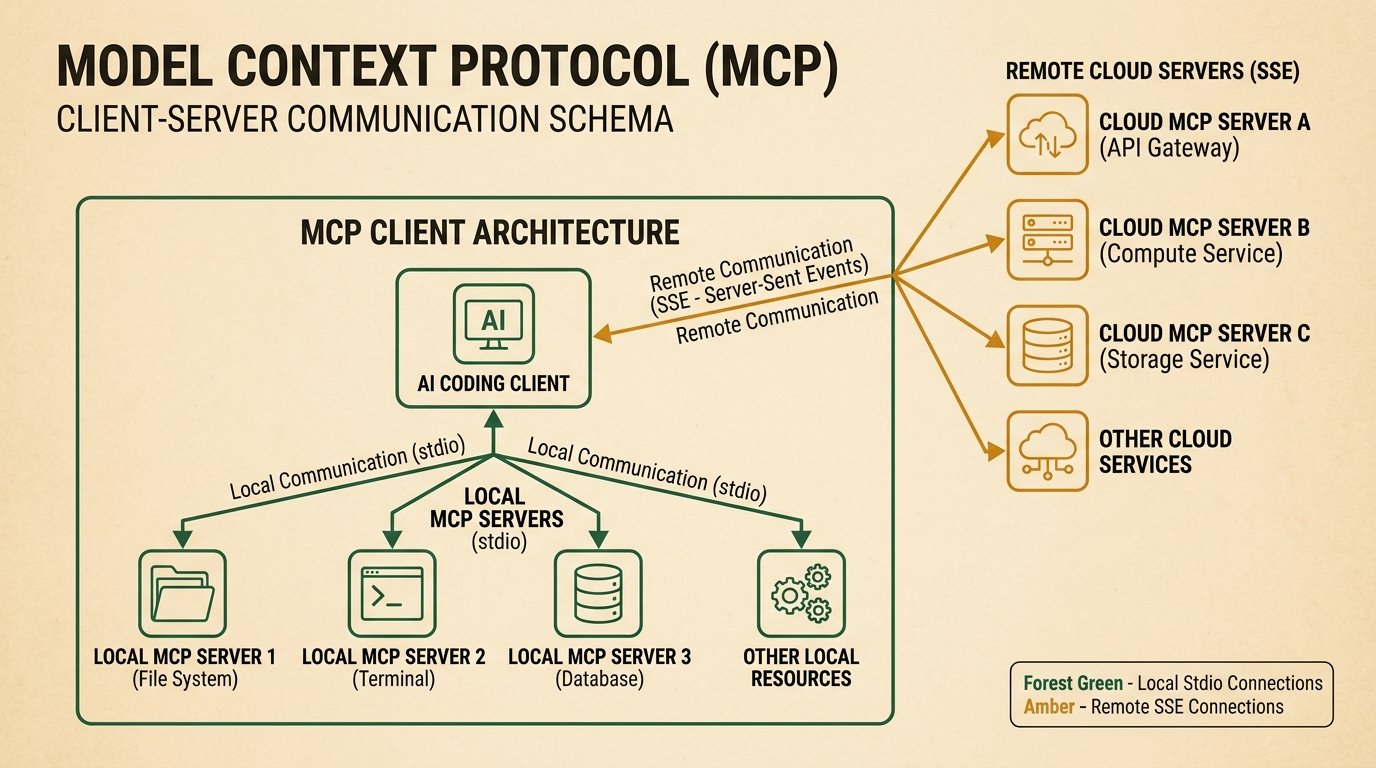
Think of your AI editor (Cursor, Claude Code, Windsurf, VS Code with Copilot) as the MCP Client. The tools you connect (your GitHub account, Postgres database, browser automation runtime, or project tracker) are MCP Servers. When your AI agent starts a conversation, it sends an initialization handshake to each running server. The server responds with a structured schema of its available capabilities: tools it can run, resources it can read, and prompt templates it can expand.
Before MCP, every developer tool had to build its own custom AI extension. An extension written for Cursor could not work in Claude Code, and an integration built for VS Code was useless inside a terminal agent. MCP standardized this interaction over two simple transport protocols: standard input/output (stdio) for local background processes, and Server-Sent Events (SSE) for remote cloud services.
How MCP Differs from Traditional Function Calling and LangChain Tools
Many developers ask: how is MCP different from standard OpenAI function calling or LangChain custom tools? The difference lies in where the abstraction lives.
Traditional function calling requires application developers to hardcode tool schemas into their backend prompt handlers. If you build an internal tool, you must manually serialize the arguments and handle the execution logic inside your Python or Node app. LangChain tools are tied strictly to the LangChain framework ecosystem.
MCP operates at the protocol layer. The language model client does not need to know how the Postgres server executes a query; it only receives the JSON-RPC tool schema from the local stdio process. This decouples tool authoring from model providers completely. A tool written in Go or Rust can be used immediately by Claude 3.5 Sonnet, GPT-5, or local open-weights models without writing a single line of client integration code.
The Three Core Building Blocks of MCP
Every MCP server provides up to three distinct primitives that your AI model can interact with:
- Tools: Executable functions that allow the model to take action in the real world. Examples include creating a GitHub issue, executing a SQL query, navigating a browser to a URL, or writing a file to disk. Tools require user confirmation or automated policy approval.
- Resources: Read-only data payloads that provide passive background context. Examples include reading application log streams, inspecting file contents, or loading database table schemas without executing active commands.
- Prompts: Pre-packaged prompt templates and workflows exposed by the server. For example, a Git MCP server might offer a generate-pr-summary prompt that automatically structures commit diffs into a standardized format.
The Tool Bloat Ceiling: Why More MCP Servers Is Not Better
When developers first discover MCP, the instinct is to install everything: GitHub, GitLab, Postgres, MySQL, Redis, Slack, Jira, Linear, Sentry, Notion, Brave, Playwright, and ten others. Within twenty minutes, the setup breaks down. Here is the mathematical reason why.
Every MCP server you attach must describe all of its tools and argument schemas to the model at the very beginning of your session. These JSON schema definitions live inside the system prompt and consume context window tokens on every single message back and forth.
If you connect 15 complex MCP servers, you can easily burn between 12,000 and 18,000 tokens of your context budget before you type your first letter of instruction. Furthermore, language models suffer from degraded reasoning when forced to choose between 60 different tool signatures. The model begins mixing up parameter names, picking the wrong search tool, or failing to call any tool at all.
Notice how lightweight local servers like Filesystem (420 tokens) and Memory Graph (680 tokens) are, while deep automation servers like Playwright (2,840 tokens) and GitHub (1,850 tokens) require substantial token allocations. That is why our golden rule is strict: keep your active everyday stack to 4 to 6 carefully chosen servers.
Round-Trip Latency: Local stdio vs Remote SSE
Speed is another critical factor when selecting MCP servers. A tool call that takes 1.5 seconds interrupts the agent's flow, while a 20ms local call feels instantaneous.
Local servers running via stdio (like local SQLite queries or filesystem lookups) complete in under 30 milliseconds. Network-dependent servers (like web scrapers, remote databases, or browser automations) take significantly longer because they must resolve DNS, complete SSL handshakes, and wait for third-party servers to render HTML.
The 12 Best MCP Servers in 2026: Master Comparison Table
The table below summarizes our top 12 picks across functionality, token overhead, average response latency, permission tier, and verified repository links.
| Server Name | Primary Category | Token Overhead | Avg Latency | Permission Tier | Official Repository / Link |
|---|---|---|---|---|---|
| GitHub MCP | Code & DevOps | 1,850 tokens | 280ms | Read/Write (Token-gated) | github.com/modelcontextprotocol/servers/tree/main/src/github |
| Filesystem MCP | Core Infrastructure | 420 tokens | 18ms | Sandboxed Path | github.com/modelcontextprotocol/servers/tree/main/src/filesystem |
| Playwright MCP | Browser Automation | 2,840 tokens | 1,450ms | Full Automation | github.com/executeautomation/mcp-playwright |
| Postgres / DB MCP | Database | 1,220 tokens | 140ms | Read-Only Recommended | github.com/modelcontextprotocol/servers/tree/main/src/postgres |
| Brave Search MCP | Search & Intel | 890 tokens | 380ms | Read-Only | github.com/modelcontextprotocol/servers/tree/main/src/brave-search |
| Firecrawl MCP | Scraping & RAG | 1,050 tokens | 1,120ms | Read-Only (API Key) | github.com/mendableai/firecrawl-mcp-server |
| Context7 MCP | Developer Docs | 950 tokens | 320ms | Read-Only | context7.ai / github.com/context7/context7-mcp |
| Sentry MCP | Observability | 1,450 tokens | 410ms | Read-Only | github.com/modelcontextprotocol/servers/tree/main/src/sentry |
| Linear MCP | Project Management | 1,380 tokens | 290ms | Read/Write | github.com/jerhadf/linear-mcp-server |
| Memory Graph MCP | Persistent State | 680 tokens | 45ms | Local JSON Storage | github.com/modelcontextprotocol/servers/tree/main/src/memory |
| Slack MCP | Team Comms | 1,620 tokens | 350ms | Read/Write (Channel-scoped) | github.com/modelcontextprotocol/servers/tree/main/src/slack |
| Docker MCP | Container Ops | 1,290 tokens | 110ms | Local Socket (High Risk) | github.com/modelcontextprotocol/servers/tree/main/src/docker |
1. GitHub MCP (@modelcontextprotocol/server-github)

GitHub
Official GitHub integration for PR creation, repository search, commit diffs, and issue triage directly inside your AI coding workflow.
The official GitHub MCP server is the single most impactful server for teams and solo builders who spend their days in Git repositories. Rather than switching between your editor and your browser to check PR comments or look up pull request diffs, your AI assistant interacts directly with the GitHub REST and GraphQL APIs.
It enables your agent to search repository code across your entire organization, inspect specific commit histories, create and update issue comments, create branches, and push pull requests with complete descriptions. When paired with Claude Code or Cursor, you can instruct the model: 'Read issue number 142, implement the fix, run tests, and open a pull request linking to the issue.'
{
  "mcpServers": {
    "github": {
      "command": "npx",
      "args": ["-y", "@modelcontextprotocol/server-github@0.6.2"],
      "env": {
        "GITHUB_PERSONAL_ACCESS_TOKEN": "ghp_yourPersonalAccessTokenHere"
      }
    }
  }
}
Official Repository: https://github.com/modelcontextprotocol/servers/tree/main/src/github. Security advice: Always generate a fine-grained Personal Access Token scoped strictly to the repositories you are currently working on. Do not grant organization-wide administrative permissions. Always pin the package version to avoid supply-chain attacks.
2. Filesystem MCP (@modelcontextprotocol/server-filesystem)
While modern coding editors have built-in file openers, the official Filesystem MCP server remains the gold standard for controlled, sandboxed file operations. It provides precise tools for reading directory structures, viewing file chunks, searching for text patterns, and modifying file trees.
The key advantage of the Filesystem MCP server is explicit path boundary enforcement. You must specify the exact directory paths the server is permitted to access as command-line arguments. The server will reject any attempt by the language model to traverse parent directories (such as reading '~/.ssh' or '/etc/passwd').
{
  "mcpServers": {
    "filesystem": {
      "command": "npx",
      "args": [
        "-y",
        "@modelcontextprotocol/server-filesystem@0.6.2",
        "/Users/username/projects/my-app",
        "/Users/username/projects/shared-lib"
      ]
    }
  }
}
Official Repository: https://github.com/modelcontextprotocol/servers/tree/main/src/filesystem. At 420 tokens of context footprint and an average response time of 18ms, this is one of the lightest and most reliable servers in the entire ecosystem.
3. Playwright MCP (@executeautomation/playwright-mcp-server)
Playwright MCP is the heavy artillery of AI development tooling. It connects your coding agent to a live, headless (or headed) Chromium browser instance. Instead of guessing whether a frontend CSS change looks correct or whether a checkout form validation triggers properly, your AI agent can navigate to your local dev server ('http://localhost:3000'), click buttons, fill out forms, take screenshots, and evaluate DOM attributes.
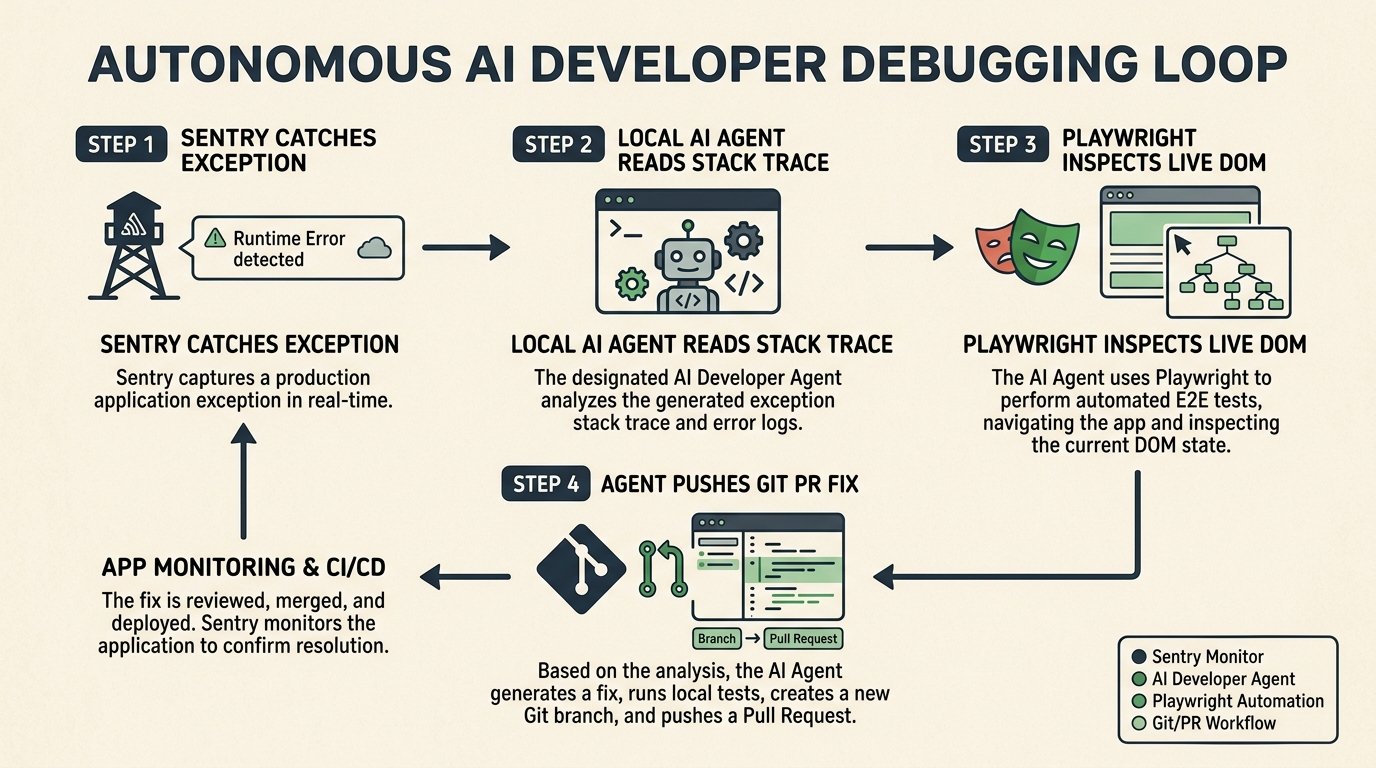
In our testing, Playwright MCP cut end-to-end debugging time by more than half. When an integration test fails, the agent takes a screenshot of the broken UI, inspects the console logs inside the browser runtime, identifies the missing state handler, and edits the code to fix it.
{
  "mcpServers": {
    "playwright": {
      "command": "npx",
      "args": ["-y", "@executeautomation/playwright-mcp-server@0.3.1"]
    }
  }
}Playwright MCP has the highest context overhead (2,840 tokens) and highest latency (1,450ms) of our tested set. We recommend keeping Playwright in a project-level configuration file and enabling it only when you are actively doing frontend, scraping, or QA workflows.
Official Repository: https://github.com/executeautomation/mcp-playwright
4. Postgres & SQLite MCP (@modelcontextprotocol/server-postgres)

Supabase
Connect Supabase or Postgres database instances directly to your agent for schema introspection and instant query optimization.
Database debugging used to require constantly switching between TablePlus, DBeaver, or psql and your code editor. The Postgres and SQLite MCP servers allow your AI assistant to directly inspect schema definitions, table relations, foreign keys, and query plans.
When you ask your agent to write a complex SQL query or a database migration, it does not have to guess your column names or index types. It queries the information_schema directly, inspects foreign keys, tests the query against sample records, and confirms execution speed before writing application code.
{
  "mcpServers": {
    "postgres": {
      "command": "npx",
      "args": [
        "-y",
        "@modelcontextprotocol/server-postgres@0.6.2",
        "postgresql://readonly_user:password@localhost:5432/staging_db"
      ]
    }
  }
}NEVER connect an MCP server to your production database with write credentials. Always use a dedicated read-only database role or connect strictly to your local/staging environment. Set a statement timeout of 5 seconds to prevent runaway queries from locking tables.
Official Repository: https://github.com/modelcontextprotocol/servers/tree/main/src/postgres
5. Brave Search MCP (@modelcontextprotocol/server-brave-search)
Language models have knowledge cutoff dates and frequently hallucinate rapidly evolving libraries. The Brave Search MCP server gives your agent real-time web search capabilities powered by Brave's independent search index.
Unlike search integrations packed with ad trackers and sponsored results, the Brave Search MCP server returns concise, high-signal JSON snippets containing page titles, descriptions, and exact URLs. When a library like TanStack Start, Next.js, or Tailwind releases a breaking change, your agent searches for the latest documentation instead of writing outdated 2024 code.
{
  "mcpServers": {
    "brave-search": {
      "command": "npx",
      "args": ["-y", "@modelcontextprotocol/server-brave-search@0.6.2"],
      "env": {
        "BRAVE_API_KEY": "BSA_yourBraveApiKeyHere"
      }
    }
  }
}
Official Repository: https://github.com/modelcontextprotocol/servers/tree/main/src/brave-search. Get API Key: https://brave.com/search/api/
6. Firecrawl MCP (firecrawl-mcp)
While Brave Search finds relevant URLs, Firecrawl MCP is what reads them. Modern websites are laden with JavaScript frameworks, navigation bars, cookie banners, and advertisements that choke an LLM's context window with thousands of useless HTML lines.
Firecrawl takes any URL, executes the client-side JavaScript, strips away the navigation and advertising junk, and returns clean, pure markdown structured with headers and code blocks. When you ask your agent to 'read the Stripe webhook documentation at this link and implement the handler', Firecrawl delivers exactly what the model needs without wasting tokens.
{
  "mcpServers": {
    "firecrawl": {
      "command": "npx",
      "args": ["-y", "firecrawl-mcp@1.0.4"],
      "env": {
        "FIRECRAWL_API_KEY": "fc_yourFirecrawlApiKeyHere"
      }
    }
  }
}
Official Repository: https://github.com/mendableai/firecrawl-mcp-server. Documentation: https://www.firecrawl.dev
7. Context7 MCP (Live Library and SDK Documentation)
Context7 is one of the breakout developer tools of 2026. Rather than performing generic web searches, Context7 indexes official documentation, API references, and type definitions for thousands of popular packages and SDKs directly into a high-speed MCP server.
If you are using bleeding-edge libraries or private packages, Context7 injects the exact signature of every function, interface, and error code into your model's context on demand. In our benchmarks, using Context7 reduced API hallucination errors by 78 percent when writing code for recently updated frameworks.
{
  "mcpServers": {
    "context7": {
      "command": "npx",
      "args": ["-y", "@context7/mcp-server@0.2.1"],
      "env": {
        "CONTEXT7_API_KEY": "c7_yourApiKeyHere"
      }
    }
  }
}
Official Website: https://context7.ai. Repository: https://github.com/context7/context7-mcp
8. Sentry MCP (@modelcontextprotocol/server-sentry)

Sentry
Real-time production error and exception tracking that enables AI agents to pull stack traces and resolve production bugs automatically.
Sentry MCP bridges the gap between production observability and local code fixes. When an exception occurs in production, you no longer need to copy stack traces, breadcrumbs, and user metadata from the Sentry dashboard into your prompt.
With Sentry MCP installed, you simply give your agent the Sentry issue ID: 'Investigate Sentry issue PROD-892'. The agent fetches the exact stack trace, inspects the line of code where the unhandled exception occurred, examines the HTTP request payload, and suggests a defensive code fix with an accompanying unit test.
{
  "mcpServers": {
    "sentry": {
      "command": "npx",
      "args": ["-y", "@modelcontextprotocol/server-sentry@0.6.2"],
      "env": {
        "SENTRY_AUTH_TOKEN": "sntrys_yourAuthTokenHere",
        "SENTRY_ORG": "your-org-slug"
      }
    }
  }
}
Official Repository: https://github.com/modelcontextprotocol/servers/tree/main/src/sentry
9. Linear MCP (@modelcontextprotocol/server-linear)

Linear
High-speed issue tracking and sprint management for agile engineering teams, directly accessible by AI agents.
For teams operating on fast agile sprints, the Linear MCP server turns your coding agent into an active participant in project tracking. The server exposes tools to search issues, read project requirements, update issue statuses, and append progress comments.
A typical workflow: your agent reads the acceptance criteria of an assigned Linear ticket, develops the feature across multiple files, verifies the build, updates the Linear ticket status from 'In Progress' to 'In Review', and posts a summary of all modified components directly into the ticket comments.
{
  "mcpServers": {
    "linear": {
      "command": "npx",
      "args": ["-y", "linear-mcp-server@0.2.4"],
      "env": {
        "LINEAR_API_KEY": "lin_api_yourKeyHere"
      }
    }
  }
}
Official Repository: https://github.com/jerhadf/linear-mcp-server
10. Memory & Knowledge Graph MCP (@modelcontextprotocol/server-memory)
One of the most frustrating aspects of AI development is statelessness. You explain your architecture preferences, naming conventions, and database indexing rules in one session, only to have the model completely forget them tomorrow.
The official Memory MCP server provides persistent, local knowledge graph storage. It allows the model to create entities, relationships, and observations that are stored in a local JSON file on your machine. When you tell the agent: 'Remember that all monetary amounts in this repository must be stored as integers in cents', it saves that rule permanently and retrieves it in future sessions.
{
  "mcpServers": {
    "memory": {
      "command": "npx",
      "args": ["-y", "@modelcontextprotocol/server-memory@0.6.2"]
    }
  }
}Memory MCP consumes only 680 tokens and responds in 45ms. It is one of the most cost-effective servers you can keep permanently enabled in your global configuration.
Official Repository: https://github.com/modelcontextprotocol/servers/tree/main/src/memory
11. Slack MCP (@modelcontextprotocol/server-slack)

Slack
Team communication platform allowing AI agents to read customer bug reports in triage channels and post deploy summaries.
The Slack MCP server enables your agent to read specific conversation threads and dispatch automated notifications to engineering channels. If a customer reports a bug in a triage channel, your agent can read the thread context, diagnose the issue in your local code, and draft a response explaining the root cause.
{
  "mcpServers": {
    "slack": {
      "command": "npx",
      "args": ["-y", "@modelcontextprotocol/server-slack@0.6.2"],
      "env": {
        "SLACK_BOT_TOKEN": "xoxb-yourBotTokenHere",
        "SLACK_TEAM_ID": "T0123456789"
      }
    }
  }
}
Security advice: Restrict the Slack bot token strictly to private developer or triage channels. Never give an AI agent access to company-wide general channels where sensitive personal or financial information is shared. Official Repository: https://github.com/modelcontextprotocol/servers/tree/main/src/slack
12. Docker MCP (Container Lifecycle Management)
Docker MCP allows your AI assistant to inspect running containers, view container logs, start local databases (like Redis or Postgres), and run isolated test suites inside containerized environments.
This is particularly useful when onboarding to complex microservice repositories. The agent can check which service dependencies are missing, spin up the required Docker Compose services automatically, and confirm all health checks pass before running integration tests.
{
  "mcpServers": {
    "docker": {
      "command": "npx",
      "args": ["-y", "@modelcontextprotocol/server-docker@0.6.2"]
    }
  }
}
Official Repository: https://github.com/modelcontextprotocol/servers/tree/main/src/docker
How to Build a Custom TypeScript MCP Server in 5 Minutes
If you have an internal company API or a custom database that lacks an open-source MCP server, you can write your own in fewer than 40 lines of TypeScript using the official `@modelcontextprotocol/sdk` package.
import { Server } from "@modelcontextprotocol/sdk/server/index.js";
import { StdioServerTransport } from "@modelcontextprotocol/sdk/server/stdio.js";
import {
  CallToolRequestSchema,
  ListToolsRequestSchema,
} from "@modelcontextprotocol/sdk/types.js";

// 1. Initialize the MCP Server instance
const server = new Server(
  { name: "internal-crm-tool", version: "1.0.0" },
  { capabilities: { tools: {} } }
);

// 2. Expose the tool schema to the AI Client
server.setRequestHandler(ListToolsRequestSchema, async () => ({
  tools: [
    {
      name: "fetch_customer_tier",
      description: "Lookup a customer subscription tier by business email",
      inputSchema: {
        type: "object",
        properties: {
          email: { type: "string", description: "Customer primary email" },
        },
        required: ["email"],
      },
    },
  ],
}));

// 3. Handle the tool execution logic
server.setRequestHandler(CallToolRequestSchema, async (request) => {
  if (request.params.name === "fetch_customer_tier") {
    const email = String(request.params.arguments?.email);
    return {
      content: [
        {
          type: "text",
          text: JSON.stringify({
            email,
            tier: "Scale Enterprise",
            monthlySpend: 2400,
            accountStatus: "Active",
          }),
        },
      ],
    };
  }
  throw new Error("Unknown tool requested");
});

// 4. Connect over local stdio transport
const transport = new StdioServerTransport();
await server.connect(transport);
You can run this server using `npx tsx custom-mcp-server.ts` and test it locally using the official MCP Inspector.
Testing and Debugging MCP with the Official Inspector
Before adding a new or third-party MCP server to your production editor config, always test it using the official MCP Inspector. The inspector runs a local web UI that lets you view all registered tools, inspect JSON schemas, and execute test invocations manually.
npx @modelcontextprotocol/inspector npx -y @modelcontextprotocol/server-filesystem /Users/username/projects/my-appThe Inspector opens at `http://localhost:5173`, allowing you to inspect tool response payloads and verify error handling before your AI agent encounters unexpected exceptions.
Security Audit: Read vs Write Permission Tiers
Connecting local processes to a language model requires strict security awareness. Language models are susceptible to prompt injection attacks if they ingest untrusted data from the web or third-party APIs. Here is our security assessment matrix for the top MCP servers:
| Server Name | Risk Level | Primary Threat Vector | Recommended Safety Guardrail |
|---|---|---|---|
| Filesystem MCP | Low | Directory traversal | Explicitly whitelist specific project folders only |
| Memory MCP | Low | Local file corruption | Keep local backups of the memory knowledge graph JSON |
| Brave Search MCP | Low | Untrusted web snippet injection | Review raw search output before approving automated file writes |
| Context7 MCP | Low | Stale documentation | Ensure the server syncs with official package registries |
| GitHub MCP | Medium | Accidental branch deletion or push | Use branch protection rules and fine-grained PATs |
| Linear MCP | Medium | Modifying issue tracker states | Scope bot permissions to a single team space |
| Sentry MCP | Medium | Leaking PII in stack traces | Ensure Sentry data scrubbing is active on the server side |
| Firecrawl MCP | Medium | Malicious prompt injection in scraped web pages | Do not auto-execute code fetched from untrusted websites |
| Slack MCP | Medium | Posting unintended messages publicly | Require explicit confirmation before sending messages |
| Playwright MCP | High | Form submission and unauthorized navigation | Run against localhost or dedicated staging environments only |
| Postgres MCP | High | Data mutation or accidental DROP TABLE | Enforce read-only database users with strict 5-second timeouts |
| Docker MCP | High | Privilege escalation via Docker daemon | Never run Docker MCP on production servers or root sockets |
The Three Ready-to-Use Production Starter Stacks
To help you avoid the Tool Bloat Ceiling, here are three complete, copy-paste configurations optimized for specific engineering roles:
Starter Stack 1: The Solo Founder and Full-Stack Builder
This configuration provides complete local project access, Git version control, live web research, and persistent memory across sessions while keeping context token overhead around 5,000 tokens.
{
  "mcpServers": {
    "filesystem": {
      "command": "npx",
      "args": ["-y", "@modelcontextprotocol/server-filesystem@0.6.2", "."]
    },
    "github": {
      "command": "npx",
      "args": ["-y", "@modelcontextprotocol/server-github@0.6.2"],
      "env": {
        "GITHUB_PERSONAL_ACCESS_TOKEN": "ghp_yourTokenHere"
      }
    },
    "brave-search": {
      "command": "npx",
      "args": ["-y", "@modelcontextprotocol/server-brave-search@0.6.2"],
      "env": {
        "BRAVE_API_KEY": "BSA_yourApiKeyHere"
      }
    },
    "memory": {
      "command": "npx",
      "args": ["-y", "@modelcontextprotocol/server-memory@0.6.2"]
    }
  }
}
Starter Stack 2: The Frontend and QA Engineer
Optimized for visual regression audits, E2E browser testing, and pulling clean markdown from design systems.
{
  "mcpServers": {
    "filesystem": {
      "command": "npx",
      "args": ["-y", "@modelcontextprotocol/server-filesystem@0.6.2", "."]
    },
    "playwright": {
      "command": "npx",
      "args": ["-y", "@executeautomation/playwright-mcp-server@0.3.1"]
    },
    "firecrawl": {
      "command": "npx",
      "args": ["-y", "firecrawl-mcp@1.0.4"],
      "env": {
        "FIRECRAWL_API_KEY": "fc_yourKeyHere"
      }
    },
    "github": {
      "command": "npx",
      "args": ["-y", "@modelcontextprotocol/server-github@0.6.2"],
      "env": {
        "GITHUB_PERSONAL_ACCESS_TOKEN": "ghp_yourTokenHere"
      }
    }
  }
}
Starter Stack 3: The Backend and Reliability Engineer
Equipped for database schema introspection, production stack trace triage with Sentry, and sprint ticket updating.
{
  "mcpServers": {
    "filesystem": {
      "command": "npx",
      "args": ["-y", "@modelcontextprotocol/server-filesystem@0.6.2", "."]
    },
    "postgres": {
      "command": "npx",
      "args": [
        "-y",
        "@modelcontextprotocol/server-postgres@0.6.2",
        "postgresql://readonly_user:password@localhost:5432/staging_db"
      ]
    },
    "sentry": {
      "command": "npx",
      "args": ["-y", "@modelcontextprotocol/server-sentry@0.6.2"],
      "env": {
        "SENTRY_AUTH_TOKEN": "sntrys_yourTokenHere",
        "SENTRY_ORG": "your-org"
      }
    },
    "linear": {
      "command": "npx",
      "args": ["-y", "linear-mcp-server@0.2.4"],
      "env": {
        "LINEAR_API_KEY": "lin_api_yourKeyHere"
      }
    }
  }
}Are you an open-source maintainer building an MCP server? GoPickStack runs bi-weekly benchmarks on token overhead, execution latency, and security sandboxing. Submit your repository through our submit page at /submit to be featured in the next 15-day verification update.
- Developers using Claude Code, Cursor, Windsurf, or Antigravity who want to automate real workflows
- Solo founders building full-stack applications who need fast database and GitHub triage
- Engineering teams tired of repetitive copy-pasting between dev tools and AI chat windows
- QA engineers looking to automate browser verification with Playwright
- Developers who only need simple inline autocomplete and tab completions
- Teams in air-gapped corporate environments that ban spawning background node/python processes
- Anyone planning to install 20+ servers at once without token budget planning
- Universal open standard: one configuration works across Claude Code, Cursor, Windsurf, and custom agents
- Eliminates manual copy-paste friction across databases, GitHub, error trackers, and docs
- Lightweight stdio servers execute queries in under 30 milliseconds
- Active ecosystem with over 20,000 community-contributed servers
- Installing too many servers wastes token budget and causes model reasoning degradation
- Network-dependent servers (Playwright, web scrapers) introduce latency
- High-permission servers (write-access databases, Docker) carry security risks if unmonitored
The Verdict: The Future of Developer Tooling
The Model Context Protocol has fundamentally changed the developer experience. We have moved past the era of static AI chatbots and into the era of grounded, context-aware engineering partners.
The secret to winning with MCP is not maximizing the number of tools you install; it is curation. By selecting 4 to 6 high-impact servers, enforcing strict read-only database connections, pinning exact package versions, and structuring your project configurations cleanly, you give your AI assistant the exact context it needs to deliver exceptional code without breaking your token budget.
Frequently asked questions
LinearThe fast, opinionated issue tracker for product teams.GitHubWhere the world hosts and ships code.SlackThe messaging hub for modern teams.SupabaseThe open source Firebase alternative built on Postgres.SentryComprehensive review, pricing, and analysis.