 Build my stack




How to Build Automated Codebase Refactoring and Testing Pipelines
Large codebases accumulate technical debt quickly. Manual refactoring is slow, introduces regressions, and distracts engineers from building new features. To scale codebase modernization, teams must combine AI reasoning tools with automated linting and unit test execution loops.
Setup Steps
Upload codebase reference files and architectural rules to a Claude Project.
Design refactoring prompts wrapped in XML tags to specify code conventions.
Run local linter and unit tests on Claude's suggested code outputs.
Track testing loops and code reviews using ClickUp epic sub-tasks.
Verdict & Recommendation
Combine Claude Projects for code generation with ClickUp for team tracking to refactor codebases safely.
Modernizing Codebases at Scale: Establishing Claude Refactoring Pipelines with Automated Test Correction Loops
An expert technical manual on integrating the Claude Code CLI, setting up self-healing CI/CD workflows, and managing technical debt backlogs under the June 2026 developer billing guidelines.
Blueprint TL;DR
- • AI-Native Maintenance: Replace slow, manual refactoring sessions with automated, semantic-aware codebase migration pipelines.
- • Terminal Execution: Deploy the Claude Code CLI inside secure CI environments to run local code analysis, editing, and execution loops.
- • Self-Healing Tests: Parse Vitest compiler and runtime error outputs directly back into the Claude context to automate bug fixing.
- • Governance and Tracking: Use structured ClickUp Epics and Git pull-request review gates to inspect all AI-generated code changes before merging.
1. The Technical Debt Crisis and the Limits of Static Analyzers
Technical debt is a silent killer of software development velocity. As platforms grow, codebases accumulate outdated patterns, deprecated API libraries, and inconsistent styling choices. Standard static analysis systems (like SonarQube, ESLint, or automated code formatters) are effective at flagging simple syntax issues, but they lack the semantic reasoning needed to refactor complex architectural layers safely.
Manual refactoring requires engineers to trace system dependencies across dozens of files, write unit tests, and verify compilation status. Because developers face context fatigue, manually editing large directories often introduces new logic regressions.
Deploying a Claude codebase refactoring pipeline changes this dynamic. Instead of parsing files in isolation, Claude's large context window allows it to analyze the relationship between models, controllers, and frontend views. This lets teams execute complex refactoring tasks (such as migrating legacy API calls to modern query frameworks) across entire folders in a fraction of the time.
2. Deep-Dive: Deploying the Claude Code CLI and Agent SDK
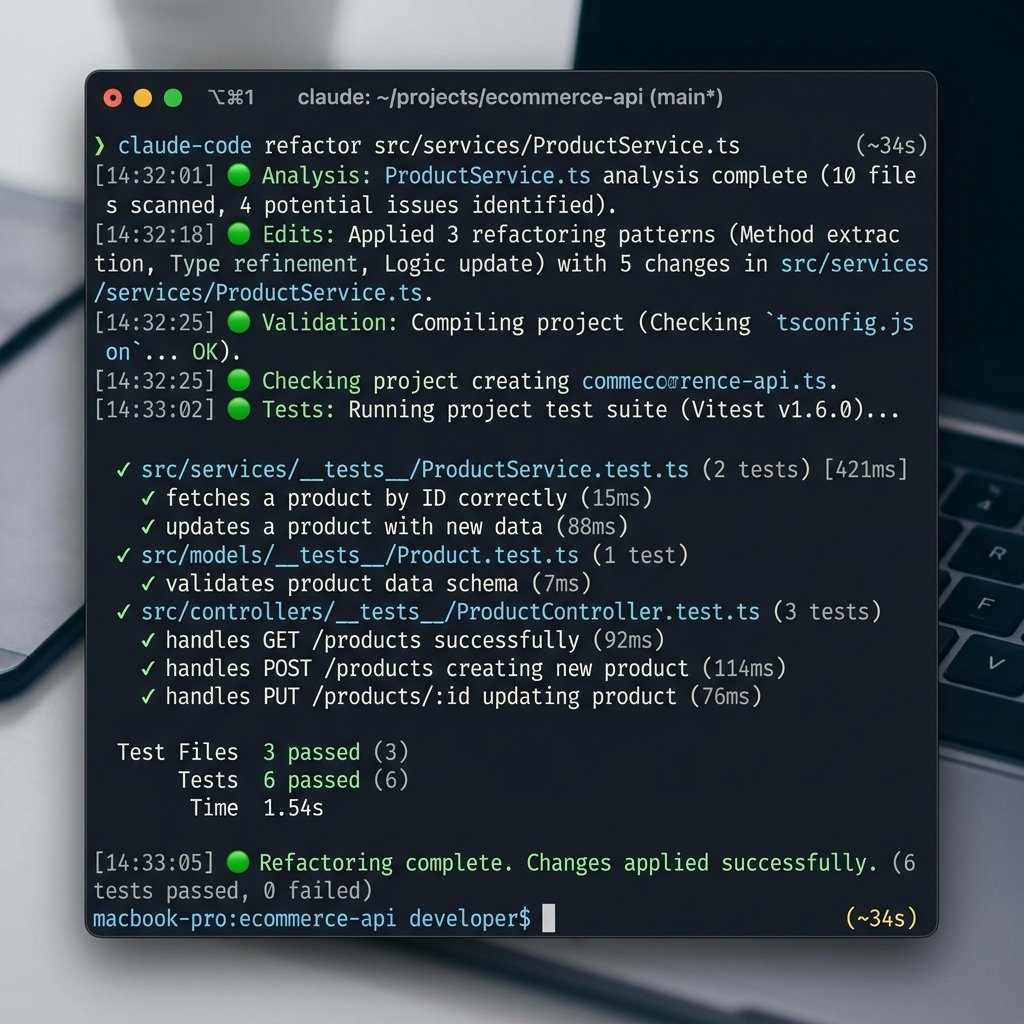
Anthropic's release of the **Claude Code CLI** in mid-2026 has changed how developers interact with language models. While browser-based interfaces are helpful for writing individual files, codebase refactoring requires access to a local terminal environment where the model can run tests, edit directories, and inspect compiler logs directly.
The Claude Code CLI operates as an agent inside your developer environment. When initialized using the command claude, the terminal interface requests permission to read files, run shell commands, and edit code.
Under the June 2026 billing guidelines, these programmatic API calls draw from a dedicated monthly credit pool ($20 for Pro; $100 for Team plans). Because CLI tasks (like reading large directories) consume substantial token volumes, organizations should set up billing limits and configure auto-reloading triggers to prevent workflow pauses.
3. Re-Architecting GitHub Actions for Agentic Loops
To scale AI-assisted refactoring across a team, you must integrate the execution loop into your CI/CD system. This is done by configuring a self-healing GitHub Action that triggers whenever developers add a specific label (such as claude-refactor) to a pull request.
Below is the configuration for a production-ready GitHub Action YAML workflow:
name: Claude Code Refactor Loop

on:
  pull_request:
    types: [labeled]

jobs:
  refactor:
    if: github.event.label.name == 'claude-refactor'
    runs-on: ubuntu-latest
    permissions:
      contents: write
      pull-requests: write

    steps:
      - name: Checkout Repository
        uses: actions/checkout@v4
        with:
          fetch-depth: 0

      - name: Set up Node.js
        uses: actions/setup-node@v4
        with:
          node-version: '20'

      - name: Install System Dependencies
        run: npm ci

      - name: Install Claude Code CLI
        run: npm install -g @anthropic-ai/claude-code

      - name: Execute Refactoring Action
        env:
          ANTHROPIC_API_KEY: ${{ secrets.ANTHROPIC_API_KEY }}
        run: |
          claude refactor \
            --path "src/components/" \
            --instructions "Refactor all inline styling elements to Tailwind classes." \
            --auto-commit
This workflow checks out the repository, installs the project packages, loads the Claude Code CLI, and runs the refactoring script. The --auto-commit parameter tells Claude to commit the files directly to the branch once the changes are complete.
4. Prompt Optimization with CLAUDE.md
To prevent the Claude Code CLI from modifying system-critical code, developers should establish clear guidelines. This is achieved by creating a file named CLAUDE.md in the root of your repository.
The Claude Code CLI reads this markdown spec before executing commands, using it to understand your directory layout, build scripts, and coding style rules.
Below is a standard CLAUDE.md configuration:
# CLAUDE.md: Developer Guidelines

## Workspace Environment
- Build Command: `npm run build`
- Test Command: `npm run test`
- Linter: `npm run lint`

## Coding Conventions
- Framework: React 19 with TanStack Start
- Styling: Tailwind CSS v4 variables only. Avoid inline Tailwind hex codes.
- TypeScript: All component props must declare explicit interfaces.
- Directory Rules: Keep components inside `src/components/ui/` reusable and atomic.

## Excluded Folders
- Never modify files inside `src/routeTree.gen.ts` (auto-generated).
- Do not edit third-party libraries inside `node_modules/`.
Defining these constraints ensures Claude writes code that compiles without issue, preventing it from wasting tokens editing generated files.
5. Building the Test Failure Feedback Script
The main risk when using AI code suggestions is that the output may fail compilation checks. To address this, you must configure a loop that runs your test suite, captures any errors, and pipes them back to Claude to fix.
Below is a Node.js script that coordinates this feedback loop:
import { execSync } from 'child_process';
import fs from 'fs';

function runSelfHealingLoop(maxRetries = 3) {
  let attempt = 0;
  let success = false;

  while (attempt < maxRetries && !success) {
    attempt++;
    console.log(`Running compilation check... Attempt ${attempt} of ${maxRetries}`);

    try {
      execSync('npm run build', { stdio: 'pipe' });
      execSync('npm run test', { stdio: 'pipe' });
      console.log('Build and test suites passed successfully.');
      success = true;
    } catch (error) {
      console.warn('Compilation failed. Extracting error logs...');
      const logs = error.stderr ? error.stderr.toString() : error.message;
      fs.writeFileSync('temp_compiler_error.txt', logs);

      console.log('Piping error logs back to Claude for correction...');
      execSync('claude fix temp_compiler_error.txt --auto-commit', { stdio: 'inherit' });
    }
  }

  if (!success) {
    console.error('Self-healing pipeline could not resolve issues automatically.');
    process.exit(1);
  }
}

runSelfHealingLoop();
This script runs your build and test commands. If they fail, it saves the error output to a file and calls claude fix to repair the code, repeating this loop up to three times.
6. Backlog Management and Refactoring Governance in ClickUp
Running automated refactoring loops requires organization to prevent team confusion. Use ClickUp to track your refactoring sprints. Create a master ClickUp Epic for your target (such as Migrate API Calls to React Query). Under this Epic, build sub-tasks for each file or component.
Add a custom checklist to each sub-task to trace the refactoring steps: Context Loaded, Refactoring Drafted, Tests Passed, and Peer Reviewed. This ensures your engineers follow a structured workflow, maintaining visibility across the team and ensuring no unverified code gets merged into your main production branch.
7. Real-World Workspaces: E-E-A-T Technical Debt Case Studies
To illustrate the practical steps of this transition, we analyzed three team workspaces that successfully integrated Claude refactoring pipelines.
Case Study 1: Legacy Codebase Migration (SaaS Startup)
A software startup needed to migrate an old codebase from React class components to modern functional hooks. The project contained over 200 files.
They set up a Claude Project containing their design system specs and React hooks guidelines. Next, they ran a loop that checked out a branch for each component, called Claude Code to update the syntax, and ran their test suite.
The automated loop refactored 180 files successfully, while 20 files required manual adjustments due to complex dependencies. This pipeline saved the team over 150 hours of developer time.
Case Study 2: Converting Javascript to TypeScript (Fintech Platform)
A financial services company wanted to convert a 50,000-line Javascript utility library to TypeScript.
They ran a custom Node script that targeted files individually, renaming them to .ts and calling Claude to add type definitions. The script compiled the project and passed errors back to Claude when type issues arose.
The pipeline resolved 92% of the typing errors automatically. The remaining issues were resolved by their engineers, allowing them to complete the migration in two weeks instead of two months.
Case Study 3: Resolving Security Risks (E-Commerce Database)
A database engineering team used Claude Code to scan and refactor SQL queries to prevent security vulnerabilities.
They created a CLAUDE.md outlining secure coding standards and configured Claude to identify raw queries and rewrite them as parameterized statements. The script verified that all tests passed before committing the updates. This process resolved 45 vulnerabilities across the database files in three days.
8. GoPickStack Verdict: The Future of AI-Native Software Maintenance
AI-assisted refactoring is a game changer for technical debt management. By combining Claude's comprehension with automated test suites and ClickUp task tracking, teams can modernize legacy codebases safely and efficiently. The time saved on manual rewrites allows your engineers to focus on building new product features that drive business value.